 Telegram Signal Copier
Copy Telegram signals to MT5. Read before you trade.
See exactly how every message of your channel is read — and what the EA does with it — before real money is involved. Then copy entries, zones, multi-TP and every follow-up automatically.
Download TSC Reader (free) Get the EA on MQL5How it works
Two parts that talk through local files on your computer — nothing in between.
1 · Your channels
You stay a normal member of the Telegram channels you already follow. The reader uses your own account and reads only the channels you tick.
2 · TSC Reader (free)
Reads new messages, edits, replies and deletions, recognises the signals and writes them to the MetaTrader 5 Common folder. Runs on Windows, macOS and Linux.
3 · The EA in MT5
Executes the signals with your risk settings, follows every update, protects the account and shows each step on the chart panel.
Built around one question
“Is it reading my channel right?” — answered before you go live.
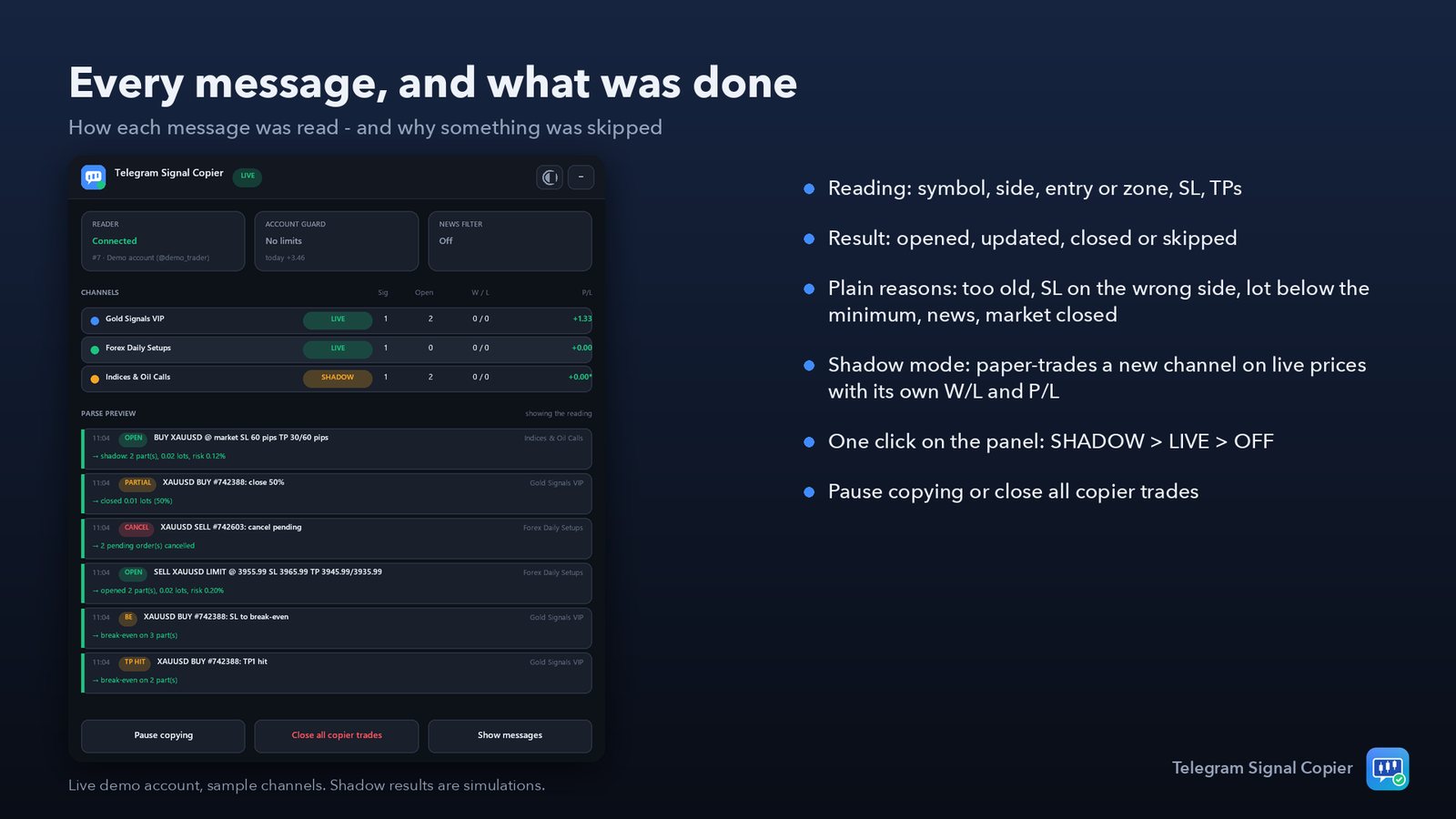
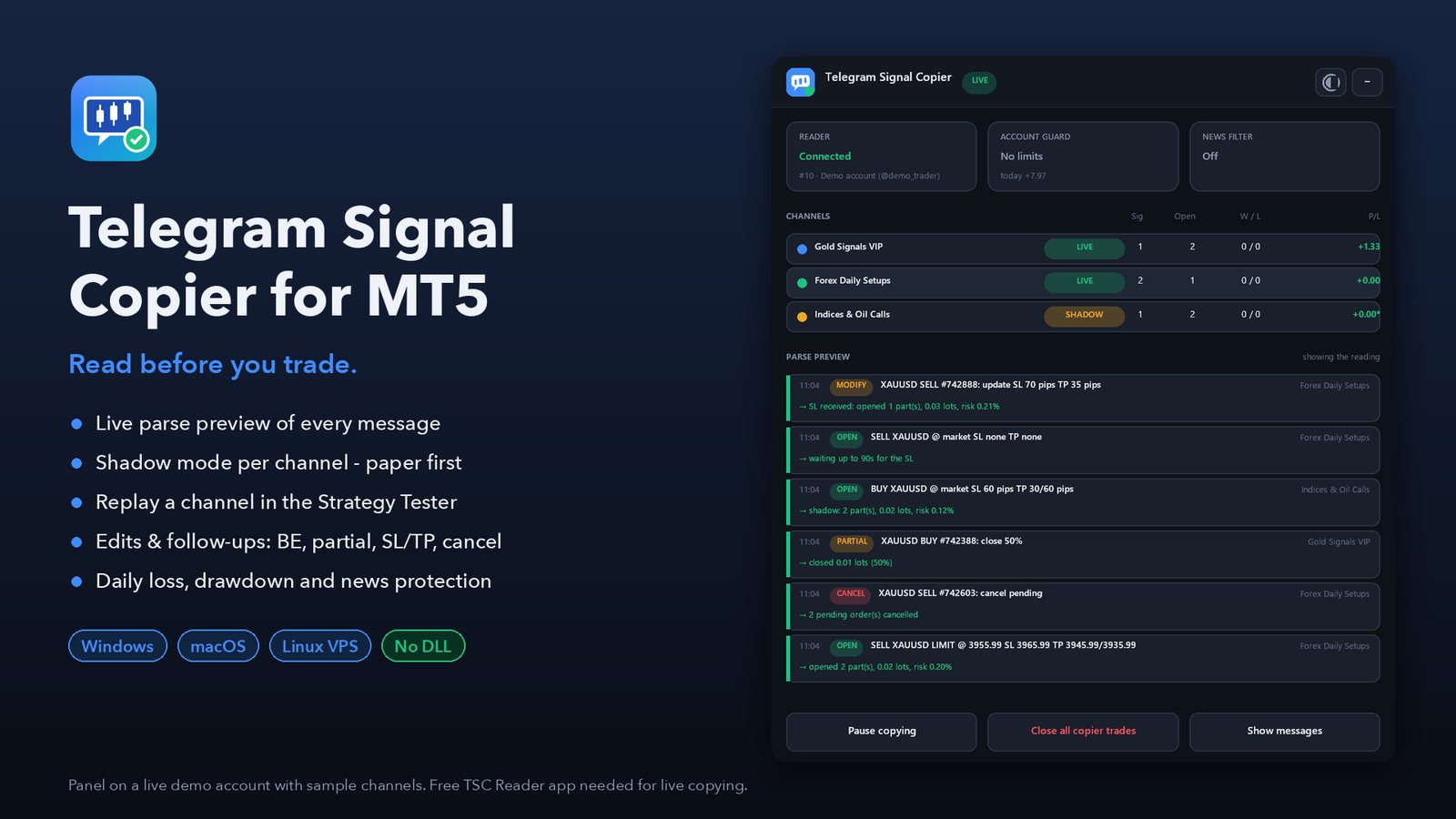
Live parse preview on the chart
- Every message with its reading: symbol, side, entry or zone, SL, TPs, follow-up type
- What the EA did: opened, updated, closed — or why it skipped it (too old, SL on the wrong side, lot below the broker minimum, news blackout, market closed)
- Pause copying or close all copier trades with one click
Shadow mode for every new channel
- New channels are paper-traded on live prices with their own wins, losses and P/L
- Switch a channel to LIVE (or OFF) with one click on the panel
- Per-channel risk multiplier and max lot
Template wizard instead of keyword lists
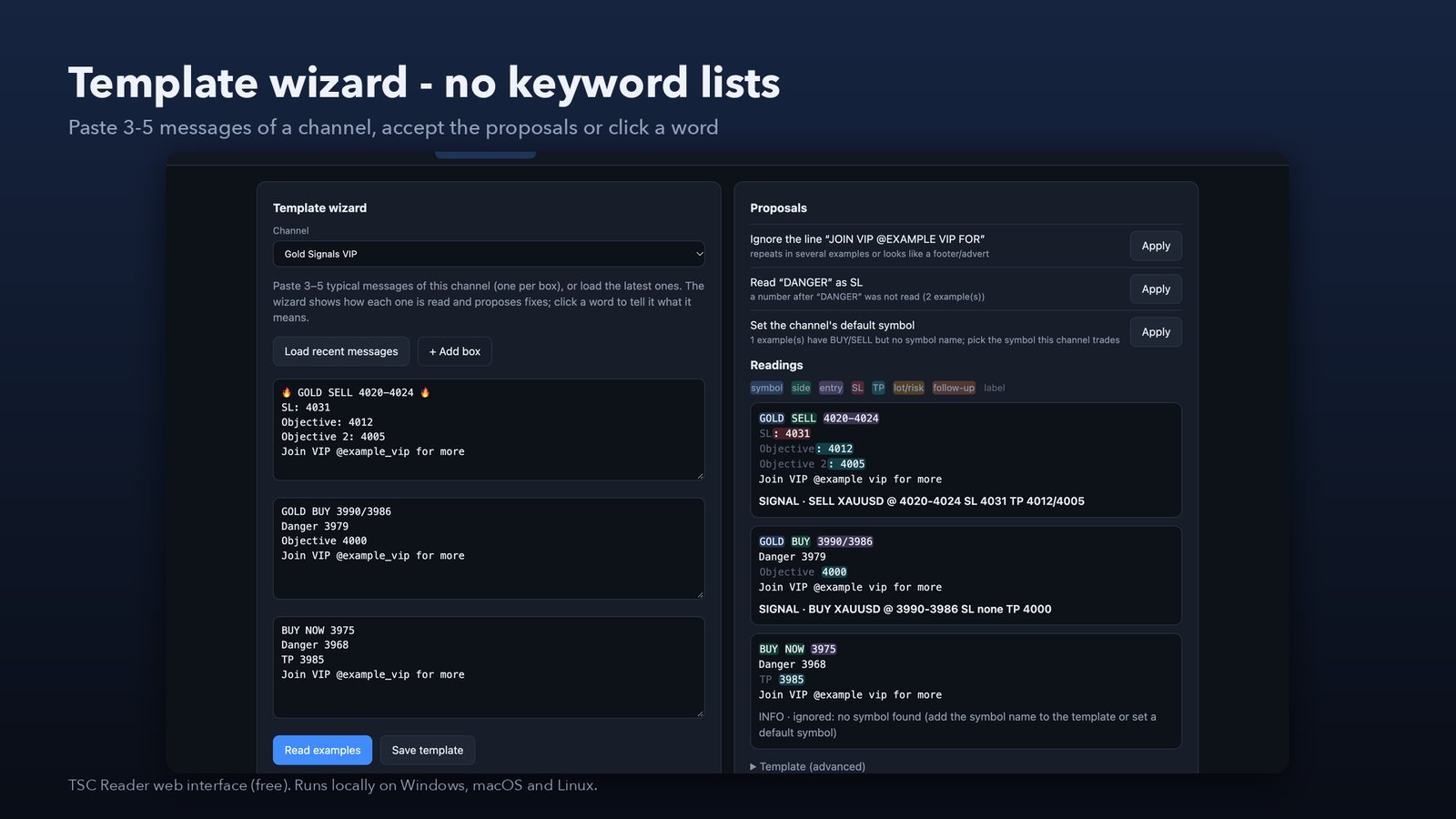
- Paste a few messages of a channel and see the reading at once
- Accept proposals: footer lines to ignore, unknown labels, a default symbol
- Click any word to say what it means
Replay a channel in the Strategy Tester
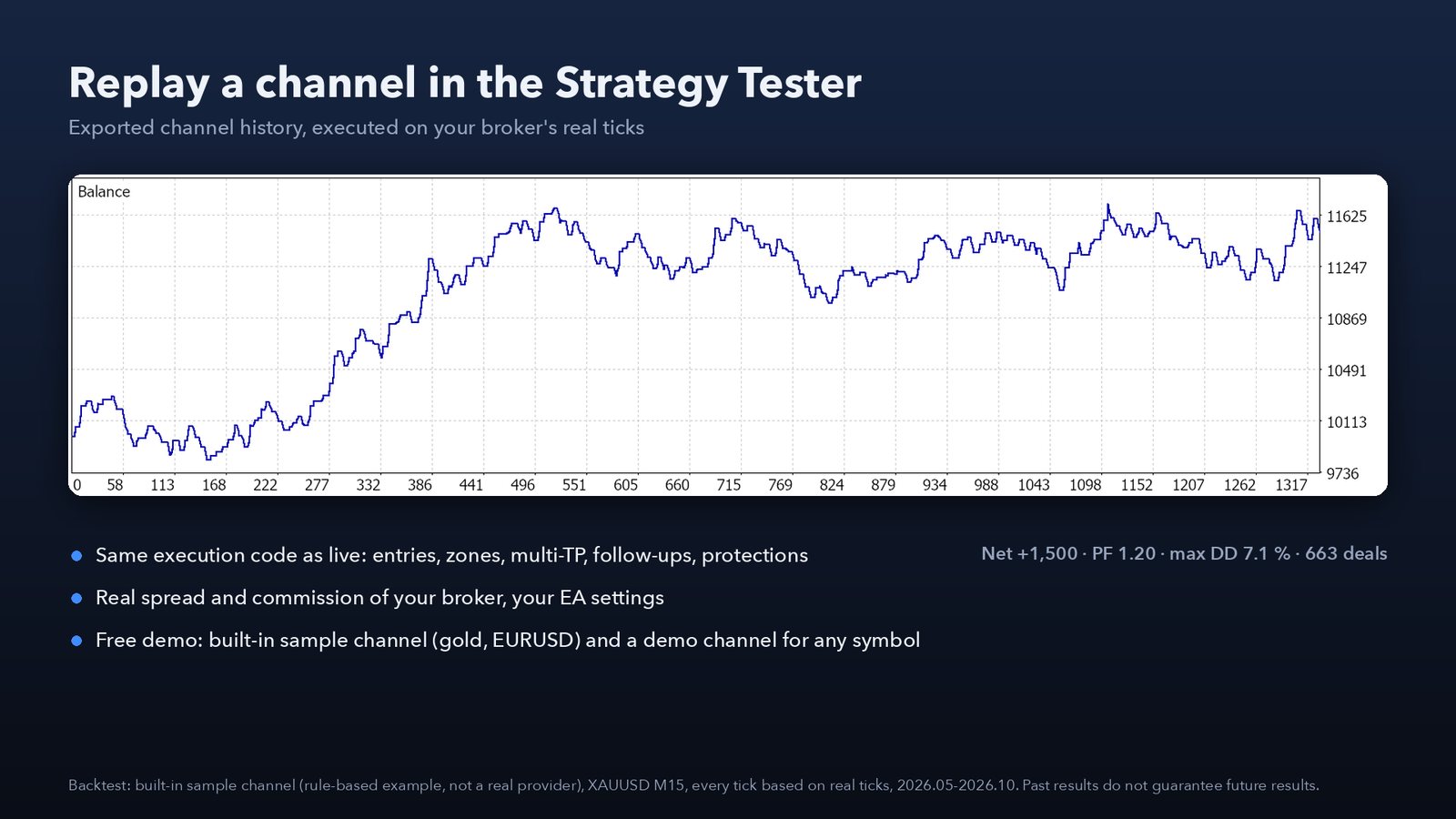
- Export a channel's history from the reader and replay it on your broker's real ticks, spread and commission
- The same execution code as live, with your EA settings
- Free demo: a built-in sample channel and a demo channel for any symbol
The chart shows a backtest of the built-in sample channel — a rule-based example, not a real provider. Past results do not guarantee future results.
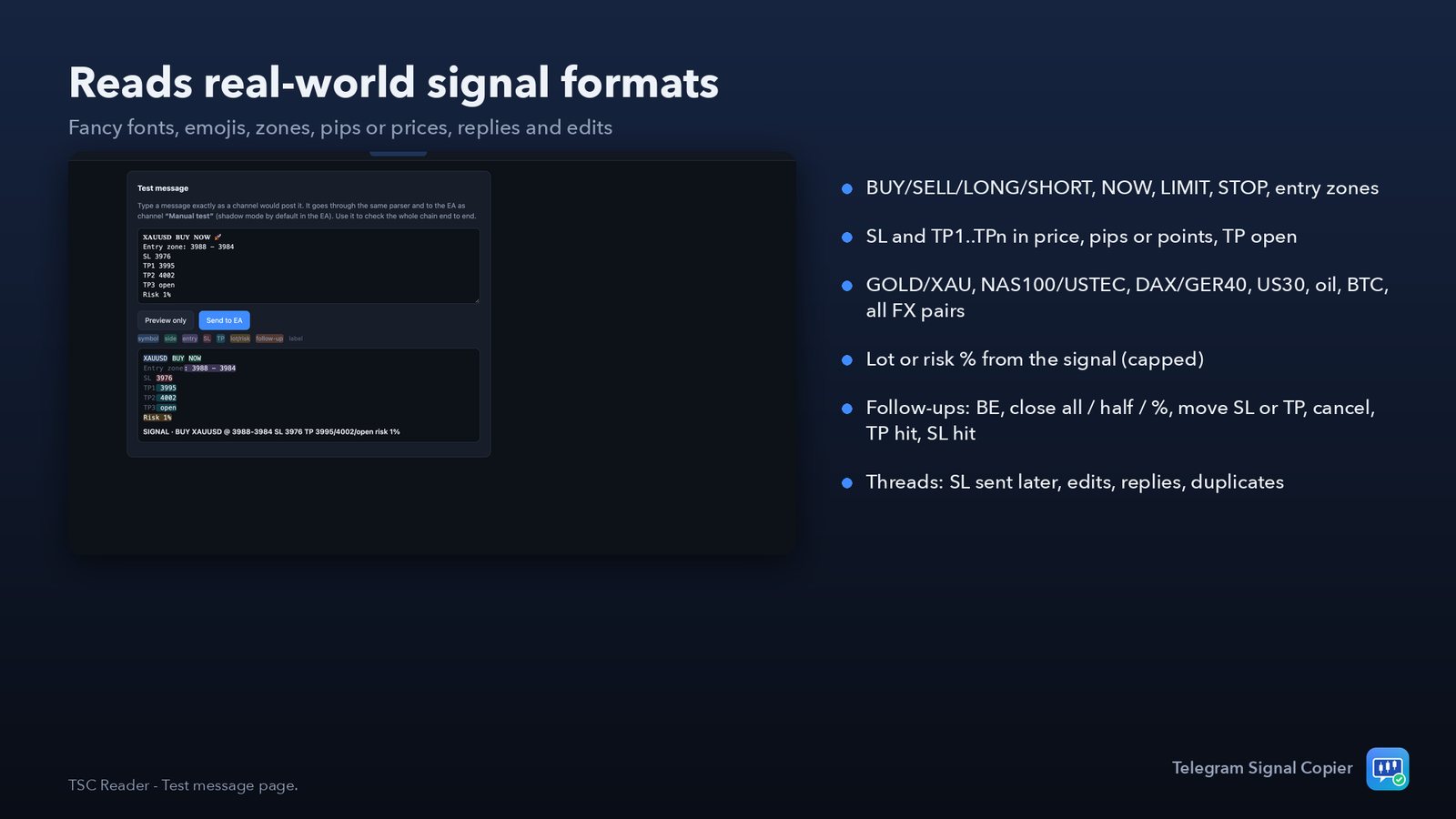
Reads real-world signal formats
- BUY/SELL/LONG/SHORT, NOW, LIMIT, STOP, entry zones, TP open
- SL and TP1…TPn in price, pips or points; lot or risk % from the signal (capped)
- Follow-ups: break-even, close all / half / %, move SL or TP, cancel, TP hit, SL hit, deleted messages
- Signals as threads: SL sent later, edits, replies, duplicates ignored
Execution and protection
Built for real accounts.
Market or pending
Market when the price is at or better than the entry, a limit otherwise; stop orders when the signal says so. Max slippage stops chasing.
Entry zones & multi-TP
Near edge, middle, far edge or split into up to 5 entries; one position per TP with your allocation.
Risk sizing
Fixed lot, % of balance or equity, money risk, lot per balance step, or the signal's lot. Clear min-lot handling.
Symbol mapping
Finds XAUUSD.a, XAUUSDm, GOLD, USTEC, DE40… on your broker by itself; your own map for special cases.
Account protection
Daily loss limit, max drawdown (static or trailing), profit target stop, max orders, lots and spread.
News & hours
News blackout from the MT5 economic calendar, trading hours and days, Friday close. Only its own orders are managed.
Your Telegram account stays safe
The reader is designed to do as little as possible with your account.
Read-only
It never sends messages, never joins or leaves channels, never reacts and never marks messages as read.
Stays on your computer
It talks only to Telegram and to the EA on the same machine. Nothing is sent to us or any other server.
Encrypted session
Your login session is stored encrypted on your computer and listed in Telegram → Settings → Devices.
One click to end it
Log out in the reader or end the session in Telegram's Devices list at any time.
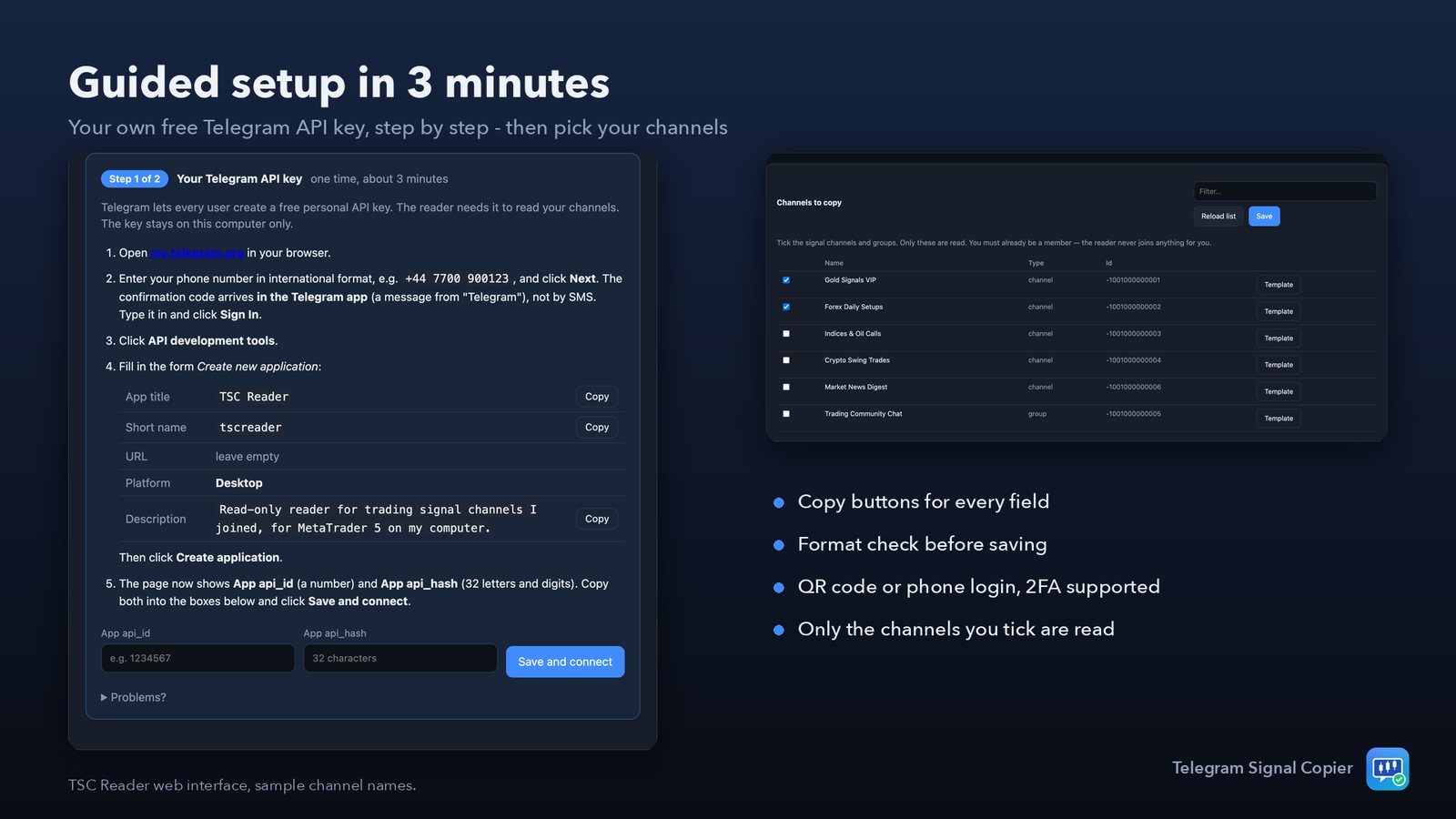
Set up in minutes
The reader guides every step.
Install the reader
Windows installer, Mac app or Linux package — no Python, no extra software.
Add your API key
A free personal Telegram key, created in about 3 minutes with the built-in guide.
Log in & pick channels
Scan a QR code with Telegram on your phone, then tick your signal channels.
Attach the EA
One chart, any symbol. Watch shadow results, then switch channels to LIVE.
Download TSC Reader Read the guide
Pricing
The reader is free. The EA is sold on the MQL5 Market — with a free demo for the Strategy Tester.
for the first copies, then $119 · 10 activations
full version for one month
full version for three months
FAQ
Do I need a Windows VPS?
No. The reader runs on Windows, macOS and Linux (also headless on a Linux VPS). MetaTrader 5 and the reader must use the same computer's MT5 Common folder.
Can it read private / VIP channels?
Yes — any channel or group your own Telegram account is a member of. It cannot read channels you have not joined, and it never joins anything for you.
Why do I need my own Telegram API key?
Telegram lets every user create a free personal key. Using your own key keeps your setup independent of anyone else. The reader shows a step-by-step guide with copy buttons; it takes about three minutes.
What if my channel writes signals in a strange way?
Check it with the Test message page and the Template wizard. Most formats are read out of the box; the wizard handles unusual labels, footers and symbol names.
Does it work with prop-firm accounts?
Yes. Use the daily loss and drawdown limits, news blackout and trading hours, and keep new channels in shadow mode until you trust them.
Are image signals supported?
Not in version 1.00 — text messages only.
Does the demo work?
Yes. The free demo from the MQL5 Market runs in the Strategy Tester with a built-in sample channel (gold and EURUSD) or a demo channel for any symbol.